
Tables are a limited resource and poor scheduling creates empty or overlapping slots.
Table Tennis Academy Management Software for table tennis academies, clubs, coaching centres and indoor sports facilities
Manage Tables, Coaching Batches and Tournaments Without Booking Chaos
Run table tennis admissions, coaching batches, table availability, attendance, fees, practice games, tournaments and player progress from one academy dashboard.
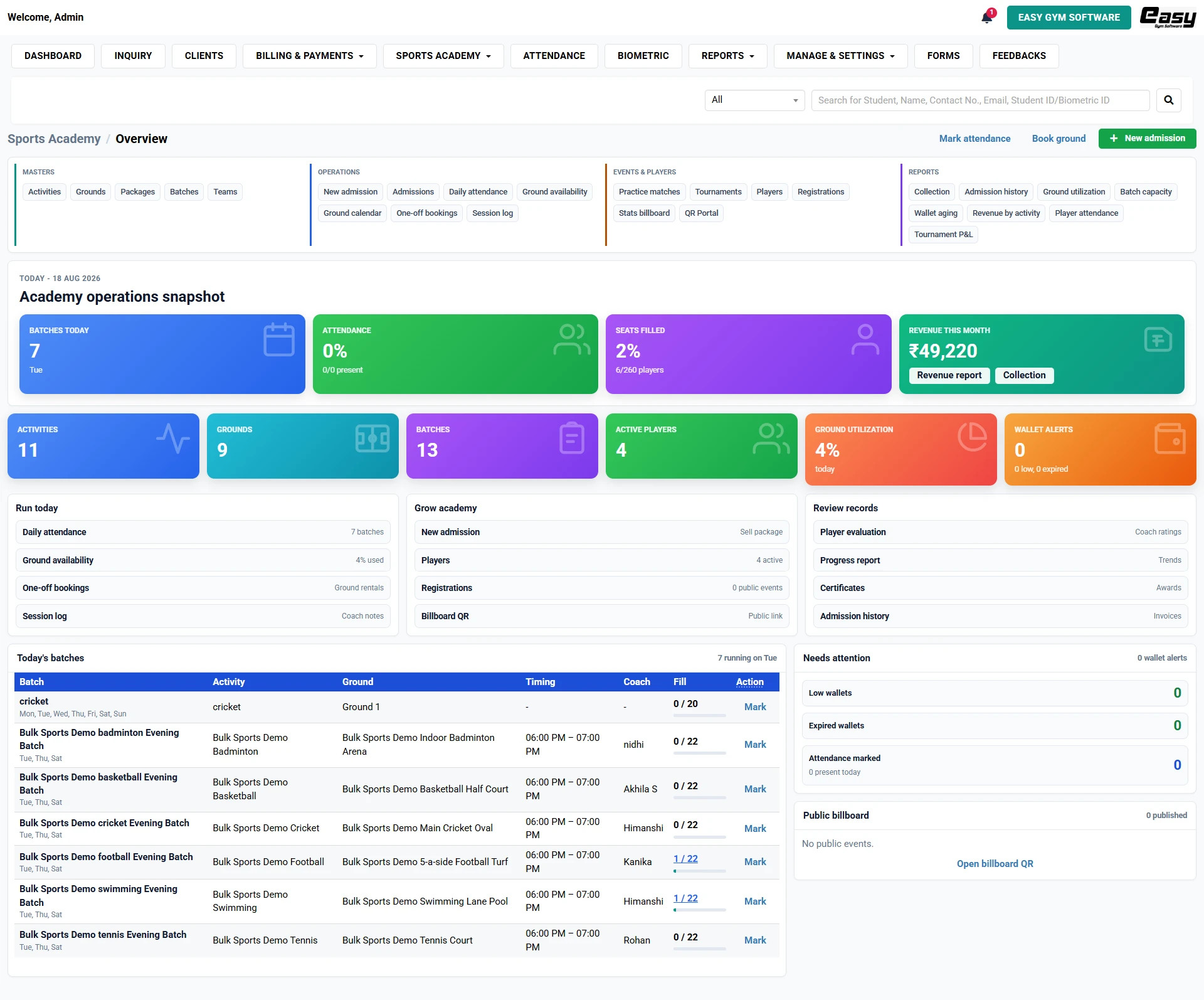
- Know today's batches, attendance, seats filled and table or training area utilisation without calling your staff.
- Keep admissions, packages, fees, tables and training areas, attendance and practice games, leagues, tournaments and registrations connected to the same player records.
- Spot pending wallets, under-filled batches and unused tables and training areas before they become lost revenue.
Free personalised walkthrough
See How Easy Gym Software Would Run Your Table Tennis Academy
We will show your exact workflow using your batches, tables and training areas and fee model.
Your Table Tennis Academy Should Not Depend on Registers, Spreadsheets and WhatsApp Memory
The hard part of running a table tennis academy is not creating one batch or collecting one payment. It is keeping dozens or hundreds of small operational decisions connected every day. When admissions, tables and training areas, fees, attendance and competitive activity live in different places, the owner loses visibility and the team spends time checking, calling and correcting.
Private coaching and group batches compete for the same tables.
Player attendance and payments are difficult to verify during busy hours.
Tournament registrations and progress notes are often handled separately.
See Today's Academy in One Screen
Open the Sports Academy Overview and immediately see batches running, attendance percentage, seats filled, active players, revenue this month, facility utilisation and wallet alerts. You should not need five reports just to understand whether the academy is running properly.
See how sports academy management software connects the same operational workflow across facilities and programmes.
Book a Free Personalised DemoFrom Enquiry to Paid Admission — Without Re-entering the Same Player
A new enquiry should become a clean admission, not another contact to copy into a second register. Easy Gym Software connects the enquiry, player profile, package, batch or team, billing and attendance workflow so staff can move a prospect into the academy with less duplicate work.
Capture the enquiry
Capture the enquiry and follow-up from the Inquiry module.
Create the player
Create the new admission and player profile.
Assign the programme
Assign level-based batches, private coaching, packages, camps and timing.
Record payment
Record billing and payment status.
Start attendance
Start attendance without another disconnected player record.
Run Tables And Training Areas and Batches Without Clashes
Scheduling becomes much easier when the team can see capacity and table or training area availability before promising a slot. The Sports Academy module combines academy operations with one-off bookings so the same facility can earn revenue without conflicts with coaching sessions.
- Use availability and calendar views for tables and training areas.
- Create group batches, private sessions and packages with capacity limits.
- Track daily attendance and coach session logs.
- Manage practice games, tournaments and registrations from the player database.
- Review utilisation and revenue by activity before adjusting your schedule.
Table CalendarCheck table or training-area availability before confirming a session.
Coaching BatchesConnect group batches and private sessions to table timings.
Daily AttendanceKeep player attendance and coach session logs connected.
Leagues and TournamentsKeep practice games, registrations and competition records together.
Manage Practice Games, Leagues, Tournaments And Registrations Without a Second Spreadsheet
Competitive activity is where many academies fall back into manual lists. Keep practice games, leagues, tournaments and registrations closer to your everyday player database. Use registrations, practice-match and tournament records, the public billboard and tournament P&L where relevant so the operational and financial side of events does not disappear into separate sheets.
Track Player Progress — Not Just Attendance
Attendance tells you whether a player came. It does not tell you what happened in the session or whether the player is improving. Use player evaluations, session logs, progress reports and certificates to build a more useful development record.
Player EvaluationRecord coach ratings or evaluation notes.
Session LogDocument what happened in a training session.
Progress ReportGive the owner, coach and parent or student a clearer development picture.
CertificatesIssue and track programme milestones where relevant.
Stop Finding Revenue Problems After the Month Is Over
Easy Gym Software brings together collection, wallet aging, batch capacity, table or training area utilisation, revenue by activity, player attendance and tournament P&L so you can see where money is stuck and where capacity is being wasted.
Which tables are available?
Which batch has space?
Which players are absent often?
Which fees are pending?
What time slots are under-used?
How many tournament registrations are confirmed?
Which programme earns the most?
Manual Academy Management vs. One Connected System
Manual / Scattered Process
With Easy Gym Software
Call staff to ask whether a table or training area is free.
Check availability and calendar before confirming the slot.
Separate admission, payment and attendance records.
Connected enquiry, admission, billing and attendance workflow.
No live view of empty or full batches.
Seats-filled and batch-capacity visibility.
Manual payment chasing.
Collection and wallet-aging visibility.
Separate lists for practice games, leagues, tournaments and registrations.
Competition and event registrations connected to academy records.
Owner depends on people for daily updates.
Dashboard and reports for operational visibility.
Built for Table Tennis Academies, Clubs, Coaching Centres And Indoor Sports Facilities
Whether you run one location or a growing operation, make it easier for staff to run the day, coaches to update records and the owner to see what is happening without being present at every desk, table or training area.
Table tennis academiesTable tennis clubsCoaching centresIndoor sports facilities
Frequently Asked Questions
What is table tennis academy management software?
Table Tennis Academy Management Software helps academies, clubs, coaching centres and indoor sports facilities manage admissions, level-based batches, private coaching, packages, camps, tables, training areas, attendance, billing, practice games, leagues, tournaments, registrations and reporting.
Can I manage multiple tables and training areas?
Yes. The Sports Academy module includes facility masters, availability and calendar views.
Can I track player attendance and progress?
Yes. Daily attendance, session logs, player evaluation, progress reports and certificates can maintain a development record.
Can I manage fees and pending payments?
Yes. Billing and payment modules work alongside collection and wallet-aging reports.
Can I manage practice games, leagues, tournaments and registrations?
The Sports Academy module includes practice matches, tournaments, registrations, a stats billboard and tournament P&L.
Can I see which batches or facilities are under-used?
Yes. Batch capacity, seats filled, table or training area utilisation and revenue-by-activity reports help identify unused capacity.
Can you show the software using my actual academy setup?
Yes. Book a free demo and we can walk through your batch structure, tables, training areas and operating questions.
Run Your Table Tennis Academy With Fewer Manual Checks
Run your table tennis academy with fewer manual checks and better visibility over admissions, tables and training areas, attendance, payments and player activity. See your academy workflow live before you decide. No obligation.